
Sections in the article
Inriver is moving towards more incremental, smaller releases to better and faster accommodate our customers. With smaller, more frequent releases, Inriver will be able to increase the quality and transparency of releases and identify and mitigate any erroneous behaviour much faster.
NB! To receive notifications when new release notes are published, please ensure you follow this page by clicking the "follow" button above.
Please see below for the deployed features and improvements:
General
It has been implemented so that the “Begins with” filter on CVL columns evaluates the displayed value rather than the internal value. This ensures results now align with what users see in the UI, making filtering in Table View accurate and intuitive.
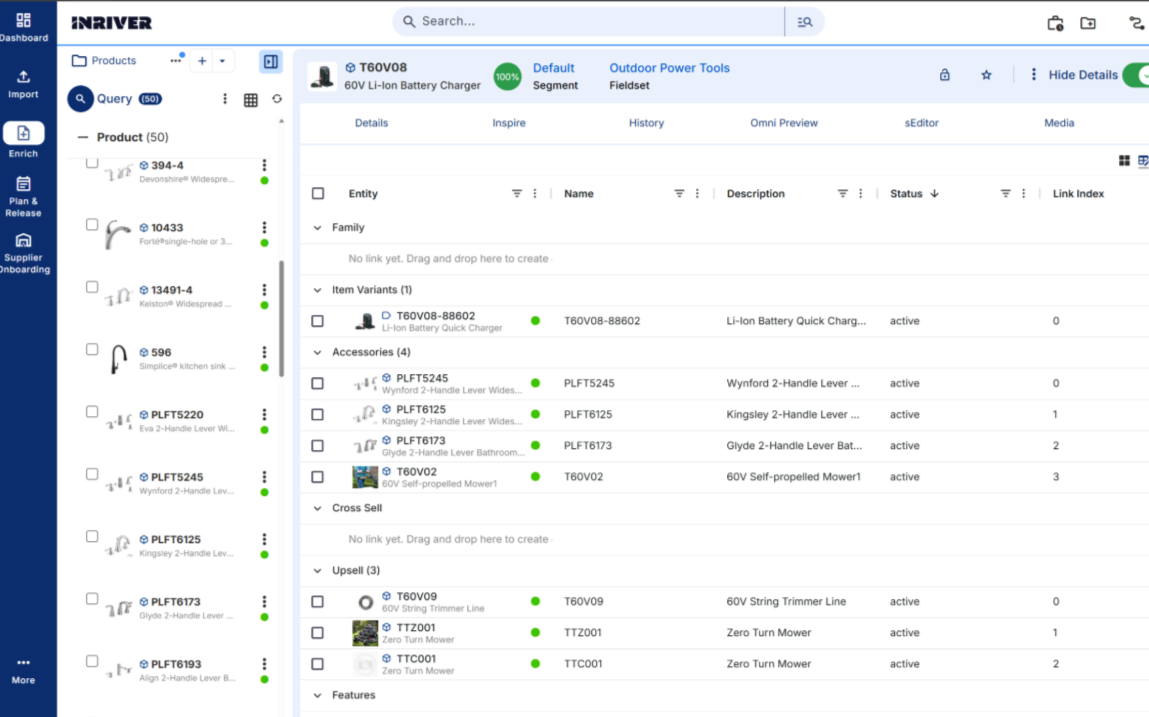
It has been implemented to enable manual sorting of linked entities in the Table View. Key enhancements include a sortable UI within the modal, enabling drag-and-drop and click-to-sort interactions when accessing sort sub-group order from the main group context menu. Custom ordering is persisted, allowing users to define and maintain the correct logical sequence of linked entities. This also improves usability by enabling targeted corrections (e.g., recreating “Day 3”) without impacting the entire sequence.
Please see below for the deployed bug fixes:
General
We have applied a solution to ensure that only active assignments are displayed on entities.
We have applied a solution to ensure that the Entity Details UI reliably renders form content when switching fieldsets or segments. An issue causing the form area to appear empty has been resolved by improving the details rendering flow, restoring consistent form display and scroll behavior after updates. Additionally, internal render handling has been simplified to eliminate duplicate render paths and enhance overall stability and reliability.
We have applied a solution to ensure that item selection search returns only relevant results as users type. The filtering logic has been refined to dynamically exclude non-matching options, and result updates have been optimized for smoother interaction, improving search efficiency and reducing visual clutter.
We have applied a solution to ensure that all field categories are consistently displayed when loading or switching to the new UI. Additionally, when reverting to the legacy UI, the previously saved collapsed/expanded state is correctly restored.
We have applied a solution to ensure that the Activated field on CVL values is properly persisted when updated. Previously, changes to deactivate a CVL value were not saved correctly, as the field always returned as active. The field now reflects user updates as expected.
We have applied a solution to ensure that Excel files exported from Google Sheets are now accepted and processed successfully during the Enrich Excel Import. Previously, these files failed to import and required users to manually re-save them in Microsoft Excel before importing. This is no longer necessary.
We have applied a solution to ensure that entity relationship activation and deactivation operations correctly target the intended link instance, even when multiple links share the same linkTypeId. The update resolves an issue where duplicate linkTypeId values caused incorrect link resolution and could trigger index out-of-range errors during link repositioning. The implementation now enforces proper link identification and clamps the newIndex within a valid range, ensuring stable and predictable behavior when managing relationships in the Portal.
We have applied a solution to ensure that item search behavior dynamically rebuilds the result set rather than toggling element visibility. Non-matching items are now removed from the DOM based on the search query, and input handling has been debounced to minimize redundant processing, resulting in improved performance, particularly with large datasets.
Inspire
We have applied a solution to ensure that CVL fields configured with parent-child relationships correctly display AI-selected values in the Table View. Child CVL fields now properly resolve and present their available options, including the value selected by the AI.
We have applied a solution to ensure that the Inspire Generate function works correctly in Table View. Previously, the Generate action could stop responding after navigating away from and returning to the Table View.
inriver Implementation Standards
Inriver's ambition is to collaborate with our partners in providing our customers with the safest and most secure PIM system possible. With that in mind, Inriver is improving the information on our Community to help implementation partners ensure quality, optimize implementations, and avoid pitfalls.
Read more about Inriver Implementation Standards
Comments
2 comments
Hi!
Do you have some screenshots as to where this improvement applies (which modal does it refer to, for example):
It has been implemented to enable manual sorting of linked entities in the Table View. Key enhancements include a sortable UI within the modal, enabling drag-and-drop and click-to-sort interactions when accessing sort sub-group order from the main group context menu. Custom ordering is persisted, allowing users to define and maintain the correct logical sequence of linked entities. This also improves usability by enabling targeted corrections (e.g., recreating “Day 3”) without impacting the entire sequence.
// Kind regards, Torbjörn
Torbjorn Stavas - Thank you for your feedback. I will make sure to include additional screenshots where appropriate.
Regarding the suggested improvement, I have attached a screenshot below for your reference.
Kind regards,
Helena
Please sign in to leave a comment.